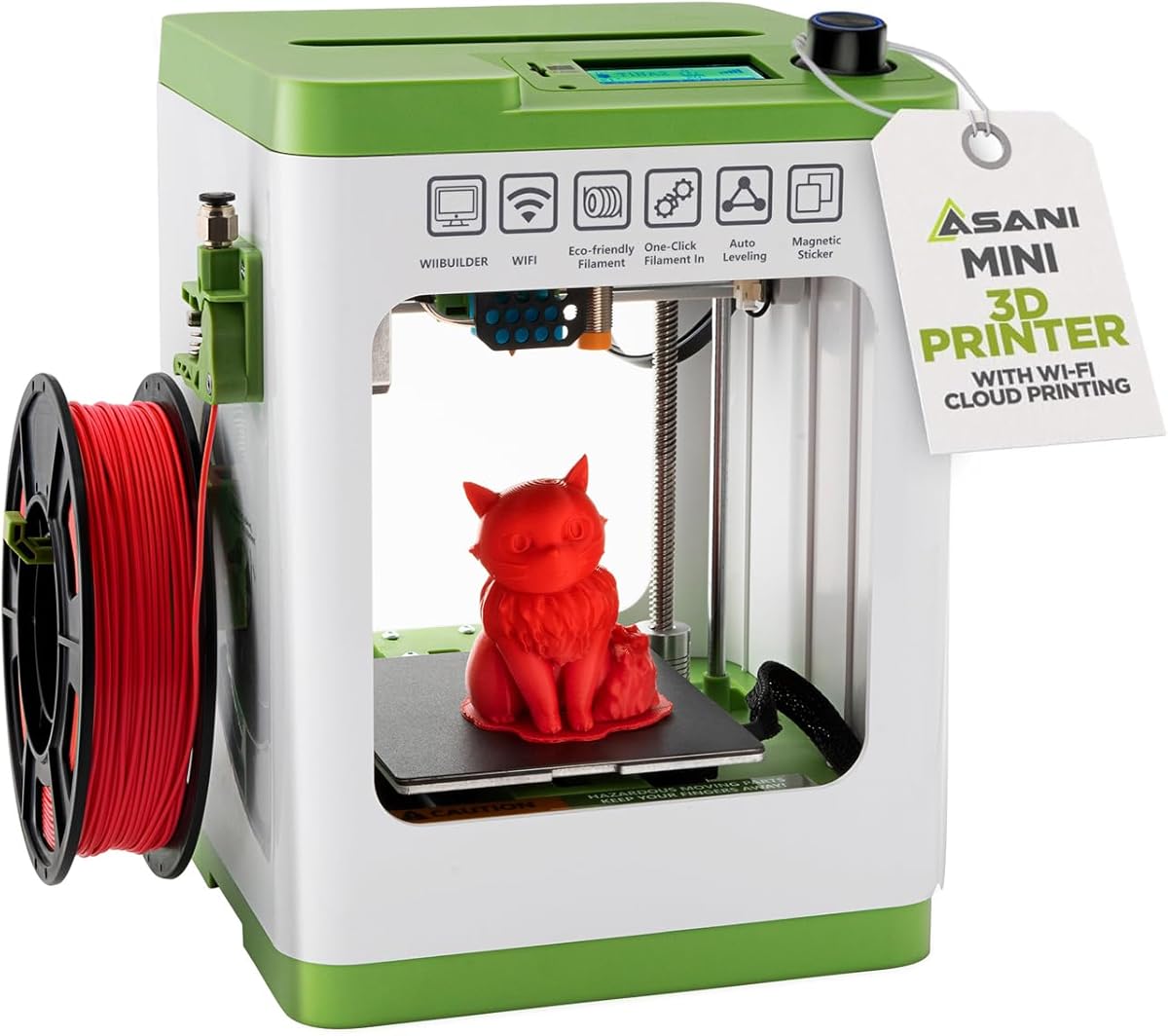
TINA2S Fully Assembled Mini 3D Printer
4.6Editor score
Fully assembled out of box
Auto-leveling technology
One-touch filament loading
Discover the top easy to use 3D printers for beginners and experts. We compare speed, calibration, safety, and features to help you pick the right model today.
Finding a reliable 3D printer can be overwhelming for newcomers. Modern machines now offer auto-calibration and user-friendly interfaces that simplify the process significantly.
We evaluated ten leading models based on ease of setup, printing speed, safety features, and community support to ensure you get the best value.
Each pick highlights key strengths and potential trade-offs. Keep in mind that prices fluctuate frequently, so check current listings before making your final decision.
4.6Editor score

4.7Editor score

4.2Editor score
This table provides a side-by-side look at the top ten models, highlighting key specifications to help you compare capabilities quickly.





The Bambu Lab A1 stands out as a premier option for those seeking a truly seamless printing experience. With a 4.7 rating from users, it delivers on its promise of being ready-to-use right out of the box. Its standout quality lies in the sophisticated auto-calibration system that eliminates the tedious leveling steps common in other machines.
We may earn a commission when you buy through this link, at no additional cost to you.
This printer excels in speed and precision, utilizing a 10,000 mm/s² acceleration to produce high-quality parts rapidly. The active flow rate compensation ensures consistent extrusion, leading to smoother surface finishes. The full-auto calibration manages Z-offset and bed leveling automatically, allowing users to focus on creativity rather than troubleshooting mechanical issues.
While the A1 is robust, users should note that multi-color printing requires an AMS lite unit, which may need to be purchased separately. Additionally, the price is higher than some entry-level options, but the time saved and reliability often justify the investment for serious hobbyists and small businesses.
This model is ideal for beginners who want to avoid frustration and experts who value efficiency. If you prioritize speed, ease of use, and reliable results, the A1 is a top recommendation. It brings ideas to life with minimal setup effort and consistent performance.
The full-auto calibration ensures every print starts correctly without manual adjustments, saving significant time and preventing failed prints.
High acceleration speeds do not compromise detail, allowing for rapid prototyping with excellent dimensional accuracy.
We may earn a commission when you buy through this link, at no additional cost to you.
The Flashforge Adventurer 5M offers a compelling mix of speed and structural integrity. Users appreciate the CoreXY all-metal structure which provides stability during high-speed printing. The automatic leveling feature simplifies the initial setup, making it accessible for those new to 3D printing technology.
We may earn a commission when you buy through this link, at no additional cost to you.
Performance-wise, this printer boasts speeds up to 600mm/s, significantly reducing print times for standard models. The direct extruder capable of reaching 280°C allows for a wider range of materials. However, users report that consistent performance can vary, leading to mixed reviews regarding reliability over time.
A notable convenience is the quick-swap nozzle system which allows changes in seconds. This minimizes downtime when switching between different print settings or materials. Despite these advantages, the lower rating suggests that some users may face calibration or connectivity issues during extended use.
This machine suits users who need fast prototyping and prefer a robust frame. If you prioritize speed and hardware durability, it is worth considering. Just be prepared to potentially troubleshoot some initial setup quirks to get the most out of its capabilities.
High travel speeds reduce production cycles, making it ideal for rapid prototyping scenarios where time is critical.
The mobile app allows for remote monitoring and adjustments, adding convenience to the printing workflow.
We may earn a commission when you buy through this link, at no additional cost to you.
For those on a budget or looking for a simple entry point, the TINA2S delivers impressive value. With a 4.6 rating, it is praised for being fully assembled right out of the box. This eliminates the complex assembly process that often discourages new users from starting their 3D printing journey.
We may earn a commission when you buy through this link, at no additional cost to you.
The printer features auto-leveling technology which ensures reliable first layers without manual adjustments. Its compact size fits well on small desks or in classrooms. Additionally, the one-touch filament loading system simplifies the process of changing materials, making it user-friendly for beginners and children alike.
While it is an excellent starter machine, the print volume is relatively small, which limits the size of objects you can create. It also lacks some advanced features found in larger units like auto-standby modes. However, for educational purposes and small personal projects, these limitations are often acceptable.
This model is perfect for kids, students, or anyone wanting to test the waters of 3D printing without a large investment. If you want a reliable, ready-to-print device that saves time on setup, the TINA2S is a strong contender. It turns creativity into reality with minimal frustration.
Being fully assembled saves hours of setup time, allowing users to start printing immediately after unboxing.
Its open-source compatibility supports learning with various slicing software, making it a versatile tool for education.
We may earn a commission when you buy through this link, at no additional cost to you.
The Bambu Lab P1S builds on the success of the A1 by adding an enclosed chamber for advanced material support. With a 4.5 rating, it is known for high reliability and speed. The enclosure allows users to print materials like ABS and ASA that require stable temperatures to prevent warping.
We may earn a commission when you buy through this link, at no additional cost to you.
Users appreciate the lightning-fast 500mm/s speeds combined with automatic leveling for a smooth experience. The ecosystem supports multi-color printing with the optional AMS module. Setup is quick, taking around 15 minutes from unboxing to first print, which makes it efficient for busy workspaces.
The main trade-off is the cost, which is higher than the A1, and the need for the AMS unit to access full multi-color capabilities. However, for professionals or hobbyists needing durable materials, the extra cost is often justified. The enclosure significantly expands material compatibility.
This printer is ideal for users who need more robust material options and faster speeds. If you plan to print engineering-grade parts or want a multi-color setup, the P1S is an excellent choice. It balances speed, quality, and advanced features effectively.
The enclosed chamber allows safe printing of ABS and ASA, expanding the range of functional parts you can produce.
Compatibility with the Bambu ecosystem ensures easy file management and cloud monitoring for streamlined workflows.
We may earn a commission when you buy through this link, at no additional cost to you.
The AOSEED AI 3D Printer is uniquely designed for children and families looking to explore creativity safely. With a 4.5 rating, it focuses on making design simple through AI tools. The enclosed design ensures safety by protecting little hands from hot parts, making it a top choice for home use.
We may earn a commission when you buy through this link, at no additional cost to you.
It features an AI Doodle tool that lets kids create models from images or text without needing complex design skills. The real-time monitoring camera allows parents to watch progress remotely. Additionally, access to over 8,000 pre-tested models means there is always something new to print.
One limitation is that it only supports single-color printing, though separate parts can be assembled for multi-color effects. The included PLA is tested for safety but options are limited. Despite this, the focus on education and fun makes these constraints less relevant for young users.
This printer is perfect for sparking creativity in children without requiring technical expertise. If you want a safe, engaging device that combines design and printing, this is a great option. It transforms toys and ideas into reality with minimal parental intervention.
Voice and image prompts allow kids to turn sketches into 3D models, removing barriers to entry for young creators.
The enclosed structure prevents accidental contact with the nozzle, ensuring a safer environment for kids at home.
We may earn a commission when you buy through this link, at no additional cost to you.
The Entina Tina2C is designed for speed and ease, promising a first print within eight minutes. With a 4.4 rating, it appeals to beginners who want immediate results. The compact design makes it suitable for small spaces, while the app control allows for convenient operation from a smartphone.
We may earn a commission when you buy through this link, at no additional cost to you.
Its key strengths include a built-in library of models and STEM learning modules that encourage educational use. The self-cleaning nozzle and magnetic build plate simplify maintenance. Users can print via WiFi or SD card, offering flexibility depending on the internet situation.
The small print volume is a significant constraint for larger projects, limiting it mostly to miniatures or parts. Also, reliance on the app for setup means connectivity issues could disrupt initial use. However, for quick projects and learning, these are minor drawbacks.
This printer is best for students or families interested in STEM education. If you need a small, quick machine for toys and learning, it is a strong choice. It prioritizes user experience and educational value over raw production size.
Integrated STEM courses help users learn engineering concepts while creating real objects, enhancing the learning experience.
Dual WiFi and offline options ensure you can always print regardless of network availability or restrictions.
We may earn a commission when you buy through this link, at no additional cost to you.
The FLASHFORGE AD5M offers a high-performance solution with its CoreXY structure and auto-calibration. A 4.2 rating reflects its reliability in delivering precise prints. The all-metal structure ensures stability during high-speed operations, making it suitable for functional parts and detailed models.
We may earn a commission when you buy through this link, at no additional cost to you.
Key features include the ability to resume after power outages and quick-swap nozzles for maintenance. The 1-click leveling simplifies setup, and multiple nozzle sizes allow for versatility. Users appreciate the balance between speed and quality provided by the 600mm/s capability.
Some users note that software updates and app connectivity can be inconsistent. This may require patience during the initial setup phase. However, once configured, the printer performs well for various materials and tasks, offering good value for its price range.
This machine is great for users seeking a balance of speed and precision. If you need a reliable printer for varied projects without too much manual work, it is a solid option. The hardware is robust, making it a good long-term investment.
Power outage recovery saves time and material by resuming prints exactly where they left off.
Quick-swap nozzles allow easy switching between fine detail and high-volume printing needs.
We may earn a commission when you buy through this link, at no additional cost to you.
The Creality Ender 3 V3 SE is a popular choice for those seeking a cost-effective entry into 3D printing. With a 4.1 rating, it is known for its reliable CR-touch auto-leveling and direct drive extruder. These features ensure consistent prints without complex manual calibration.
We may earn a commission when you buy through this link, at no additional cost to you.
It offers a high-speed capability of 250mm/s and a quiet mainboard, improving the user experience. While some assembly is required, the process is straightforward. The vast community support means finding tutorials and troubleshooting help is easy for any user.
The main trade-off is that it is not fully assembled and may need some tweaking to achieve peak performance. The interface is basic compared to premium models. However, for the price, it delivers solid performance and is a standard for many beginners.
This printer is ideal for budget-conscious users who want to learn the ropes. If you want an affordable machine with good features and support, it is a top pick. It remains one of the most trusted options in the entry-level market.
The massive user base ensures easy access to tips, mods, and troubleshooting advice for any issue.
The Sprite extruder improves handling of flexible materials like TPU, expanding print possibilities.
We may earn a commission when you buy through this link, at no additional cost to you.
The Anycubic Kobra X brings multicolor printing to the mainstream with its native 4-color system. A 4.2 rating reflects its ability to deliver colorful models without expensive add-ons. The LeviQ 3.0 leveling system ensures precise bed calibration, reducing failed prints significantly.
We may earn a commission when you buy through this link, at no additional cost to you.
Users appreciate the smart AI monitoring and remote control capabilities. The 600mm/s speed makes it efficient for rapid prototyping. However, the package does not include filament, which adds to the initial cost. This might be a downside for those expecting an all-in-one kit.
The main challenge is the higher upfront cost compared to single-color units. However, for those wanting vibrant designs, the value is clear. The system is compatible with a vast library of models, making it easy to start creating unique items.
This printer is best for those seeking color without compromise. If you want a device that handles multiple materials and colors natively, it is a strong candidate. It balances advanced features with user-friendly operation effectively.
Native multi-color support allows complex designs without purging waste, saving material and time.
AI detection of spaghetti or foreign objects alerts users to issues before they ruin a print.
We may earn a commission when you buy through this link, at no additional cost to you.
The FLASHFORGE Adventurer 5M is a strong contender for those needing high throughput. While its rating is 3.9, its features like auto-leveling and CoreXY structure offer significant advantages. The direct extruder supports a wide range of filaments up to 280°C.
We may earn a commission when you buy through this link, at no additional cost to you.
It stands out for its speed, reaching 600mm/s, which cuts print times in half compared to standard units. The all-metal frame ensures stability. However, some users report that nozzle consistency and app connectivity need attention to fully realize its potential.
This machine is best for environments where speed is priority. If you can manage occasional calibration tweaks, the output is impressive. The app monitoring adds convenience for remote management and alerts.
It is a solid pick for prototyping and small-scale production. If you prioritize speed and structural rigidity, it is worth the investment. Just be prepared to invest time in optimizing settings for best results.
High speeds reduce production cycles significantly, making it ideal for time-sensitive projects.
The app allows for adjustments and monitoring, adding a layer of convenience to daily use.
We may earn a commission when you buy through this link, at no additional cost to you.
Selecting the right printer depends on your goals, budget, and technical comfort level. Here are the key factors to consider.
Look for printers with auto-leveling and full-auto calibration to minimize manual adjustments. Machines like the Bambu Lab A1 make this process seamless.
Prioritize models that start printing quickly to avoid frustration during your first projects.
Higher speeds like 600mm/s on the FLASHFORGE Adventurer 5M reduce wait times but may require better ventilation. Check acceleration specs for performance.
Balance speed with quality to ensure your prints do not lose detail or accuracy.
Consider the physical size of objects you plan to print. Mini printers like the Tina2C are great for toys but not for larger items.
Ensure the dimensions meet your needs before purchasing to avoid limitations later on.
Check which materials the extruder supports. A 280°C nozzle allows for more advanced materials like ABS and ASA.
Open-source compatibility gives you more freedom to choose different filament brands and types.
Enclosed designs and pinch-resistant builds are crucial for homes with children. Look for TÜV-tested components for added peace of mind.
Safety should never be compromised when selecting a printer for general household use.
Remote monitoring and app control allow you to manage prints from anywhere. Features like Spaghetti detection prevent wasted time and material.
A large library of pre-tested models helps you get started quickly without designing your own objects.
Quick-swap nozzles and magnetic build plates simplify maintenance. Ensure parts are easy to replace and access.
Low-maintenance designs save time so you can focus on creating rather than fixing.
Determine your spending limit but consider long-term costs like filament and replacement parts. Premium printers often save money through reliability.
Invest in a model that offers the features you need most to maximize value and efficiency.
Start by leveling the bed automatically or manually according to the instructions. Ensure the build plate is clean and free of dust for better adhesion. Load your filament using the guided steps provided in the app or menu.
Select a pre-sliced model from the library or import your own file. Keep an eye on the first few layers via the app or camera to catch issues early. If you notice gaps or poor adhesion, pause and recalibrate the bed.
Clean the build plate regularly and check the nozzle for clogs. Use the quick-swap feature to change nozzles when needed. Store your printer in a dry place and keep software updated for optimal performance and safety.
No, most modern printers are designed for beginners. Auto-leveling and guided setup tools allow anyone to start printing within minutes. Focus on the software and models provided to get started easily.
Many models include enclosed designs and touch-safe covers. Look for features like pinch-resistant mechanisms and auto-shutdown to ensure safety. Always supervise children when using 3D printers to prevent accidents.
PLA is the easiest and safest filament to start with. It does not require high temperatures and is less likely to warp. Use the included filament to test the printer before buying your own.
Yes, some models like the Anycubic Kobra X offer native multicolor printing. Others require adding an AMS unit. Check if the printer supports multi-material printing before purchasing.
Print times vary based on size and speed. Small toys might take 20 minutes while larger parts can take hours. Faster printers reduce these times significantly.
Most printers have a power-loss recovery feature. Check the printer settings to enable resume from pause. This saves your progress so you do not lose hours of work.
We reviewed ten top models for ease of use and reliability. From the Bambu Lab A1 to budget-friendly options like the TINA2S, there is a choice for every need.
Prioritize features that matter to you such as speed, size, or safety. Investing in an easy setup process will pay off with more successful prints.
Always verify current prices and availability before purchasing. The market changes quickly so ensure you get the latest offer for your chosen model.