
msi PRO MP341CQ E12
4.2Editor score
3440 x 1440 UWQHD
120Hz Refresh Rate
AMD FreeSync Support
Finding a cheap ultrawide monitor that balances performance and price can be challenging. These displays offer immersive screens perfect for multitasking and gaming without breaking the bank.
We compared ten real products based on resolution, refresh rate, panel type, and connectivity. This list covers options from major brands and emerging manufacturers to fit various budgets.
Each pick shows key specs, pros, and cons to help you decide. Prices and availability change frequently, so check current listings before purchasing to ensure the best deal.
4.2Editor score

4.4Editor score

4.6Editor score
As an Amazon Associate we earn from qualifying purchases.
This side-by-side comparison highlights the key specifications and features of all ten monitors to help you find the perfect fit for your workspace.


This SANSUI monitor ranks high for its impressive combination of speed and resolution. With a 200Hz refresh rate and UWQHD panel, it delivers smooth visuals for gaming and work.
We may earn a commission when you buy through this link, at no additional cost to you.
The AI built-in features like Blue light reduction and Crosshair enhance usability. The 1ms response time minimizes motion blur effectively for fast-paced competitive games.
While it lacks speakers, the audio jack allows easy headphone connection. The stand tilts but does not adjust height, which may limit ergonomic flexibility for some users.
It is ideal for gamers seeking high performance on a budget. The balance of features and cost makes it a top recommendation for versatile ultrawide needs.
The 200Hz refresh rate ensures fluid motion in games, reducing lag and providing a competitive edge in fast-paced titles.
AI features like Crosshair and PQ optimize the display for gaming scenarios, enhancing focus and visual clarity during intense sessions.
We may earn a commission when you buy through this link, at no additional cost to you.
The MSI PRO MP341CQ offers excellent value for those seeking UWQHD resolution. It balances performance and cost well, making it accessible for budget-conscious buyers.
We may earn a commission when you buy through this link, at no additional cost to you.
Eye care features like Flicker Free help reduce strain during long sessions. The 120Hz refresh rate provides smoother motion compared to standard 60Hz displays.
Built-in speakers add convenience, though they may lack deep bass. The stand is limited to tilt, so an arm might be needed for better ergonomics.
This model is great for students or casual gamers on a budget. Its reliable performance and eye care make it a solid choice for daily productivity tasks.
Certified Flicker Free and Low Blue Light features protect eyes during extended use, making it suitable for long work or study sessions.
AMD FreeSync compatibility ensures tear-free gameplay by syncing the refresh rate with the GPU output for smoother visuals.
We may earn a commission when you buy through this link, at no additional cost to you.
This LG monitor stands out for its premium features and reliable performance. The USB-C connectivity simplifies setups by handling both display and charging through one cable.
We may earn a commission when you buy through this link, at no additional cost to you.
HDR10 support and 99% sRGB ensure vibrant colors for creative work. The height adjustable stand improves ergonomics significantly compared to basic tilt-only models.
While the 5ms response time is adequate for most tasks, it is slower than gaming-specific monitors. This makes it better suited for work than competitive gaming.
Professionals who value design and connectivity will love this model. It offers a polished experience with reliable color accuracy and versatile connection options.
USB-C with 65W power delivery reduces cable clutter by allowing a single cable to power and connect your laptop efficiently.
With HDR10 and 99% sRGB coverage, the display delivers true-to-life colors essential for creative design and media editing work.
We may earn a commission when you buy through this link, at no additional cost to you.
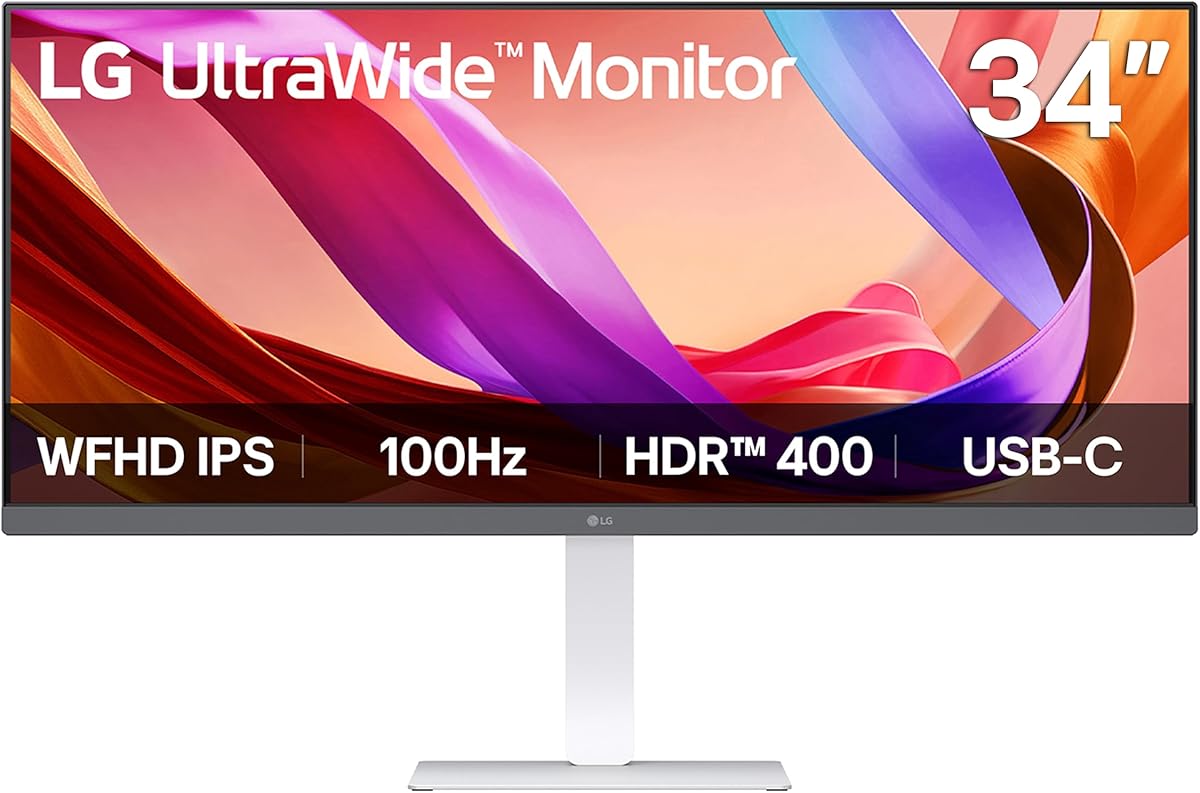
This LG model offers a crisp IPS display with solid connectivity options. The USB-C support makes it easy to connect laptops and reduce desktop clutter effectively.
We may earn a commission when you buy through this link, at no additional cost to you.
The IPS panel ensures colors remain consistent even at wide angles. The height and swivel stand adds ergonomic value rarely found at this price point.
Resolution is limited to 1080p which may not suit high-definition needs. The white bezel is sleek but requires more care to keep clean from dust.
It suits office workers needing flexibility and clear visuals. The included stand adjustments and USB-C connectivity make it a convenient choice for modern setups.
IPS technology provides wide viewing angles and accurate colors, ensuring visuals look consistent from any position at your desk.
Built-in speakers with MaxxAudio and Reader Mode provide a complete workspace solution without needing extra peripherals for sound or reading.
We may earn a commission when you buy through this link, at no additional cost to you.
This monitor combines curved design with IPS technology for rich visuals. The 96W USB-C charging supports high-power laptops, simplifying your desk setup significantly.
We may earn a commission when you buy through this link, at no additional cost to you.
Curved 3800R screen enhances immersion for media and gaming. The 99% sRGB ensures vibrant colors suitable for creative workflows and photo editing.
While the 5ms response time is standard for IPS, it is not ideal for competitive gaming. The higher price reflects the premium IPS curve features included.
Professionals needing immersion and color accuracy will appreciate this. It is a solid investment for those prioritizing visual quality and connectivity options.
USB-C handles both display signal and laptop charging up to 96W, allowing a cleaner desk with fewer cables required.
The subtle curve follows your natural line of sight, reducing eye movement fatigue and increasing focus during extended sessions.
We may earn a commission when you buy through this link, at no additional cost to you.
Samsung's ViewFinity offers a clean design with smart eye care features. The ambient light sensor auto-adjusts brightness to match your room, reducing strain effectively.
We may earn a commission when you buy through this link, at no additional cost to you.
High contrast ratio ensures deep blacks and vibrant colors. The PIP and PBP modes allow multitasking by showing two inputs on one screen.
The stand is basic and lacks height adjustment, requiring an arm for ergonomics. 100Hz is smooth for work but limited for competitive gaming needs.
Ideal for office users prioritizing eye care and design. The smart brightness and multitasking features make it a strong choice for productivity workflows.
The ambient light sensor adjusts screen brightness automatically based on your room, helping to reduce eye strain over time.
PIP and PBP let you view multiple sources simultaneously, such as documents and video calls, without switching screens constantly.
We may earn a commission when you buy through this link, at no additional cost to you.
This monitor is designed with minimal bezels for a clean multi-monitor look. The HDR10 support ensures bright highlights and deep darks for dynamic visuals.
We may earn a commission when you buy through this link, at no additional cost to you.
Eye Saver Mode reduces blue light to minimize fatigue during long hours. The high contrast ratio makes text and images sharp and clear consistently.
The stand is fixed with tilt only, limiting ergonomic adjustment options. While gaming is smooth, it is more focused on productivity and visual quality.
It fits professionals needing sharp visuals and clean design. The focus on ergonomics and contrast ensures comfort for daily work and document viewing.
With minimal bezels, this monitor looks seamless when placed next to another unit, enhancing the aesthetic of dual setups.
High contrast and HDR10 support deliver precise details, making it excellent for viewing photos and video editing tasks.
We may earn a commission when you buy through this link, at no additional cost to you.
This CRUA monitor targets gamers with a high refresh rate and color gamut. The 165Hz ensures smooth motion in fast games without visible tearing or lag.
We may earn a commission when you buy through this link, at no additional cost to you.
Wide 120% sRGB gamut makes colors pop for both gaming and design. The dual HDMI and DP inputs let you connect console and PC easily.
The stand is basic with tilt only, requiring an arm for full ergonomics. Brand support may vary compared to larger manufacturers but service is responsive.
It is a strong contender for budget gamers needing speed. The IPS panel and high Hz refresh rate make it a great pick for immersive gaming.
165Hz refresh rate ensures fluid motion in competitive shooters, giving you an edge with minimal input lag.
Wide color gamut coverage ensures rich and saturated hues that make games and media look visually striking on the IPS panel.
We may earn a commission when you buy through this link, at no additional cost to you.
Acer's Nitro offers speed at a low cost. The 200Hz refresh rate ensures fluid motion, making it a top pick for competitive shooters and racing games.
We may earn a commission when you buy through this link, at no additional cost to you.
The 1800R curve wraps around your view for better immersion. Fast response times eliminate ghosting, keeping action clear during intense gameplay sessions.
Resolution is limited to 1080p which might lack detail for text. The smaller 29.5 inch size saves space but offers less screen real estate overall.
It is perfect for gamers needing speed on a budget. The high refresh rate and deep curve provide a smooth experience for fast-paced titles.
With 200Hz and 1ms response, this monitor is designed to eliminate lag and blur for competitive gaming advantage.
The smaller size and lower resolution make it an affordable entry point for ultrawide gaming without costing much desk space.
We may earn a commission when you buy through this link, at no additional cost to you.
This KTC model balances speed with high resolution and a great stand. The 180Hz refresh rate and HVA panel ensure smooth motion and deep blacks.
We may earn a commission when you buy through this link, at no additional cost to you.
The stand offers height, swivel, and pivot, which is rare in this price bracket. High contrast ensures images look sharp and clear with deep darks.
Warranty and support terms may vary by region compared to major brands. However, responsive service is promised to help resolve any hardware issues quickly.
It suits users wanting premium ergonomics and speed. The full adjustment stand and high contrast make it a versatile pick for work and play.
Full height, swivel, and pivot adjustments allow perfect positioning, reducing neck strain during long working hours.
4000:1 contrast from the HVA panel ensures deep blacks and vivid details for movies and gaming.
We may earn a commission when you buy through this link, at no additional cost to you.
Choosing the right ultrawide monitor involves balancing resolution, refresh rate, and panel technology to meet your specific needs.
Resolution determines image sharpness and text clarity. UWQHD (3440×1440) offers more detail than standard WFHD (2560×1080) and is better for productivity.
Higher resolution improves clarity but requires a stronger GPU. Balance your resolution needs with your computer hardware capabilities.
Refresh rate affects motion smoothness and gaming performance. Higher Hz rates like 144Hz or 200Hz reduce blur and lag in fast-paced games.
For work, 60Hz to 100Hz is usually sufficient. Gamers should aim for at least 120Hz for smoother visuals.
Panel type impacts color and viewing angles. IPS panels offer best colors and angles, while VA panels provide better contrast and deep blacks.
Choose IPS for design and general use. Choose VA for media consumption and better dark room performance.
Check the inputs your setup needs. HDMI and DisplayPort are standard, but USB-C adds convenience by carrying video and power together.
Ensure your PC has matching ports. USB-C is best for laptop users needing a single cable connection.
Stand adjustability is key for long-term comfort. Look for height, tilt, and swivel options to position the screen correctly.
Fixed stands limit posture. If the stand lacks adjustment, consider adding a VESA arm for better positioning.
Eye care features like Flicker Free and Low Blue Light reduce strain during long sessions. These are vital for writers and developers.
Look for certifications like TÜV Rheinland. These ensure the monitor actually reduces harmful light emissions.
Multitasking features like PIP and PBP let you view multiple inputs on one screen. This helps when using a PC and laptop together.
These modes maximize screen real estate. Check if your chosen monitor supports splitting the display effectively.
Build quality affects durability and warranty. Major brands often offer better long-term support and consistent quality control.
Check warranty terms before buying. A solid warranty protects against panel defects and ensures long-term reliability.
Set up the stand securely to prevent tipping. Use the base as provided or install a VESA arm for better height adjustment.
Calibrate brightness and contrast to match your room lighting. This reduces eye strain and ensures colors appear accurate during work.
Clean the screen gently with a soft cloth. Avoid harsh chemicals that can damage the coating or reduce display clarity.
UWQHD provides sharper text and more screen real estate than WFHD. If you multitask or edit media, the extra pixels improve workflow efficiency significantly.
Higher refresh rates like 100Hz make scrolling and window movement smoother. While 60Hz is acceptable, higher rates improve general comfort over long days.
Many models include USB-C for display and charging. Check the wattage to ensure it can power your specific laptop model properly.
IPS panels generally offer the best color accuracy and viewing angles. VA panels have better contrast but may have narrower color consistency.
Built-in speakers are convenient for basic tasks but lack depth. For immersive audio, using headphones or external speakers is recommended.
Use Eye Saver modes and keep brightness consistent with room light. Adjusting monitor height to eye level also reduces neck strain significantly.
PIP lets you view a second input as a small window, while PBP splits the screen. Both modes help multitask with two devices on one display.
For high refresh rates and UWQHD, a dedicated GPU is recommended. Ensure your card supports the resolution and refresh rate you want.
We reviewed ten monitors offering a range of speeds, resolutions, and features to fit different budgets and workflows.
Prioritize resolution for work and refresh rate for gaming. Ensure you select a model with the connectivity and ergonomics you need.
Prices change frequently so check current listings for the best deal. Always verify availability before purchasing to secure the best value.